You don’t have to look far to find FASHN.ai. It shows up in most “best virtual try-on API” lists, has clean documentation, and delivers solid output quality. So why are developers looking for alternatives?Usually it comes down to two things: cost and fit. FASHN.ai is priced for teams that have already validated their product. If you’re still in the “does this actually work for my use case?” phase — or if you’ve validated it and now need to run 50,000 images a month without the bill tripling — the math starts to look very different.This guide breaks down what developers actually evaluate when choosing a virtual try-on API, where FASHN.ai falls short for certain use cases, and why Fitroom is worth a serious look as the primary alternative.
Pricing verified May 2026 from official pricing pages. API specs sourced from official documentation.
What Developers Actually Evaluate in a Virtual Try-On API
Demo results are easy to find. What’s harder to figure out before you’re three weeks into integration is how an API behaves in production. The real evaluation happens across two dimensions: does the output quality hold up at scale, and does the business model work for your product.
On the output side, the questions are specific: Does the garment drape naturally? Does it preserve text prints and logos? Does it handle hoodies and structured jackets — not just flat t-shirts? Are there body distortion artifacts at the edges? Does full-body work, or only half-body?
On the business side: what’s the actual cost per image when you include resolution tiers, credit multipliers, and expiry policies? How fast is the response time? Can it handle concurrent requests without queuing up? What does the documentation actually look like when you’re trying to ship?
Both dimensions matter. A cheap API with bad output teaches your users that AI try-on doesn’t work. An expensive API with great output makes your unit economics unsustainable before you reach scale. The right choice sits at the intersection.
Where FASHN.ai Works Well — and Where It Doesn’t
FASHN.ai is a technically strong product. Their Try-On Max endpoint supports resolutions up to 4K, outputs PNG or JPEG, accepts both URL and base64 input, has Python and TypeScript SDKs, webhooks, and detailed documentation. The output quality — particularly on fabric texture and drape — is among the best in the category.
It also has some genuinely useful features: 40+ preset models if you don’t have your own photos, optional prompt customization (“tuck in shirt”, “roll up sleeves”), and the ability to generate multiple images per request.
But there are real trade-offs that surface once you go beyond initial testing. 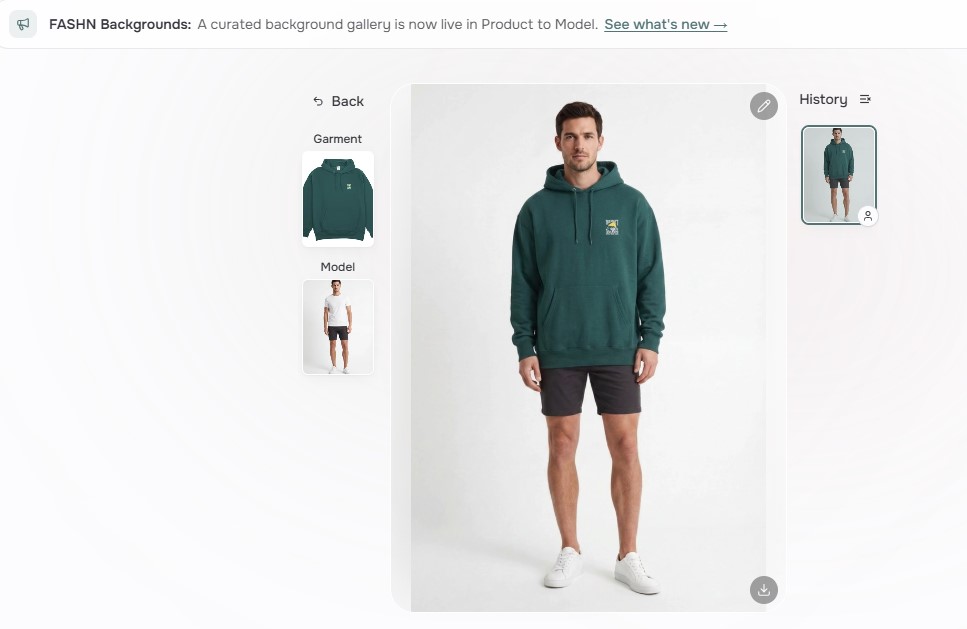
The credit multiplier problem. FASHN.ai’s pricing is per credit, not per image. Try-On Max costs 2 credits per image at the cheapest setting (1K balanced), and up to 5 credits at 4K quality mode. On-demand credits are $0.075 each — meaning the actual cost per image starts at $0.15 and goes up to $0.375 depending on your configuration. This is easy to misread when evaluating pricing. The number you see advertised ($0.075) is per credit, not per output.
Processing time for production-quality output. The standard v1.6 endpoint runs 5–17 seconds. Try-On Max — their recommended endpoint for publishable e-commerce content — runs 20 to 120 seconds depending on resolution and mode. For consumer-facing apps where users expect near-realtime feedback, that range is hard to work with.
No input validation endpoints. FASHN.ai doesn’t offer a dedicated endpoint to validate model or clothing images before running a full generation. If a user uploads a low-quality photo or an unsupported pose, you find out when the generation fails or produces a bad result. That may or may not consume credits depending on which error state is triggered.
Credit expiry on top-ups. FASHN.ai top-up credits expire after 12 months. For teams with seasonal usage patterns, this creates real wastage risk on prepaid credits that go unused.
No combo try-on. FASHN.ai handles one garment per request. If you’re building outfit coordination or selling complete looks, that’s two API calls — and two credit charges — per outfit.
Fitroom as a FASHN.ai Alternative: The Technical Case
Fitroom is a virtual try-on API built for fashion e-commerce, POD sellers, and developers integrating try-on into production applications. It’s designed around the premise that input reliability and cost predictability matter as much as output quality.
Input validation before you spend credits
Fitroom’s API includes two optional but recommended validation endpoints: Check Model Image and Check Clothes Image. Before running the try-on task, you can confirm whether the model image meets pose, lighting, and framing requirements — and whether the clothing image is suitable and what garment type it is.
In production environments, user-uploaded photos are unpredictable. A model image where the person isn’t facing forward, or a clothing image that’s too small or heavily wrinkled, produces a bad result regardless of which API you use. Fitroom lets you catch these cases before the task runs — giving you cleaner error handling and reducing wasted credits.
Simple async pipeline that maps to real user flows
Fitroom’s try-on process is asynchronous: create a task, receive a task ID, poll for status until completion. This maps well to real e-commerce UX patterns — progress indicators, background processing, loading states. Standard mode runs in approximately 9 seconds. HD mode runs in approximately 30 seconds at up to 2048px resolution.
Combo try-on in a single request
Fitroom supports upper body, lower body, full body, and combo try-on — processing a complete outfit (top + bottom) in one API call. For POD sellers building outfit pages or fashion brands featuring complete looks, this halves both API cost and latency for outfit generation.
Flat pricing — one credit, one image
Unlike FASHN.ai’s credit multiplier system, Fitroom charges one credit per image regardless of output resolution or mode. HD mode is a fixed option on a single request, not a multiplier that compounds at every tier. This makes cost forecasting straightforward: you know exactly what 1,000 images will cost before you run them.
Credits that don’t disappear
Fitroom PAYG credits never expire — buy once, use at your own pace. Subscription credits roll over month to month as long as you stay subscribed. For teams with variable or seasonal usage, this removes the risk of prepaid credits evaporating before you get to use them.
Output quality in practice
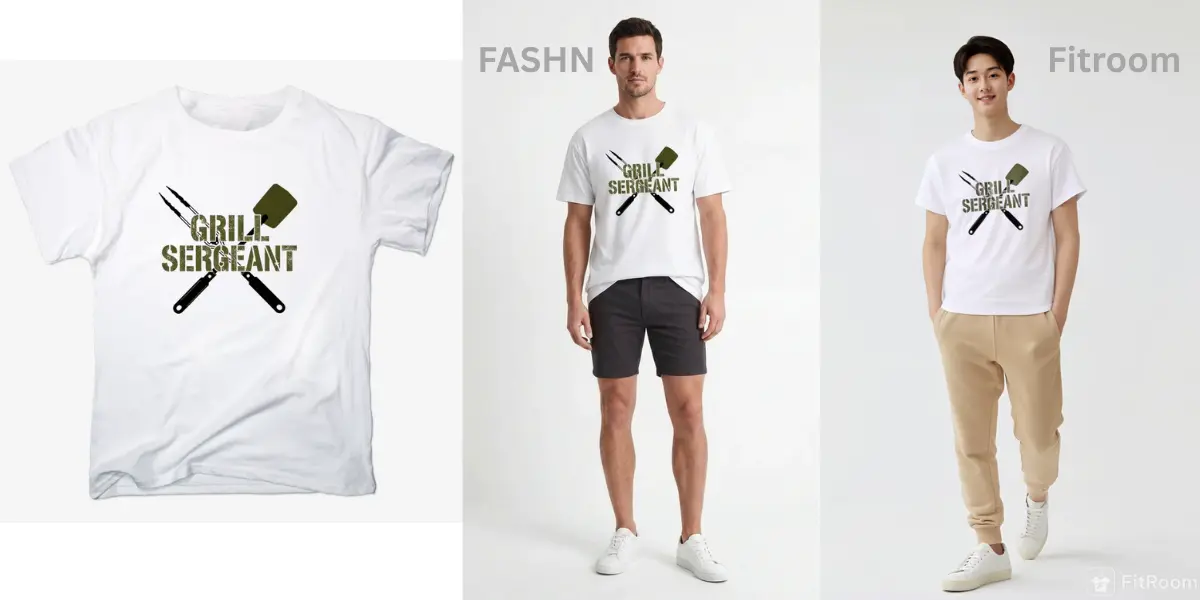
FASHN.ai’s Try-On Max produces marginally sharper fabric detail in controlled testing — particularly on texture-heavy garments. In head-to-head testing on garments with text prints, FASHN.ai preserved lettering cleanly. Fitroom’s output shows slight pixel softening on fine text. Both are commercially usable for product pages.
For the majority of POD and fashion e-commerce use cases — t-shirts, hoodies, dresses, and sweaters without detailed graphics — the quality difference is marginal and won’t affect conversion. The 60–87% cost difference will.
- **T-shirt comparison
**
- Hoodie comparison
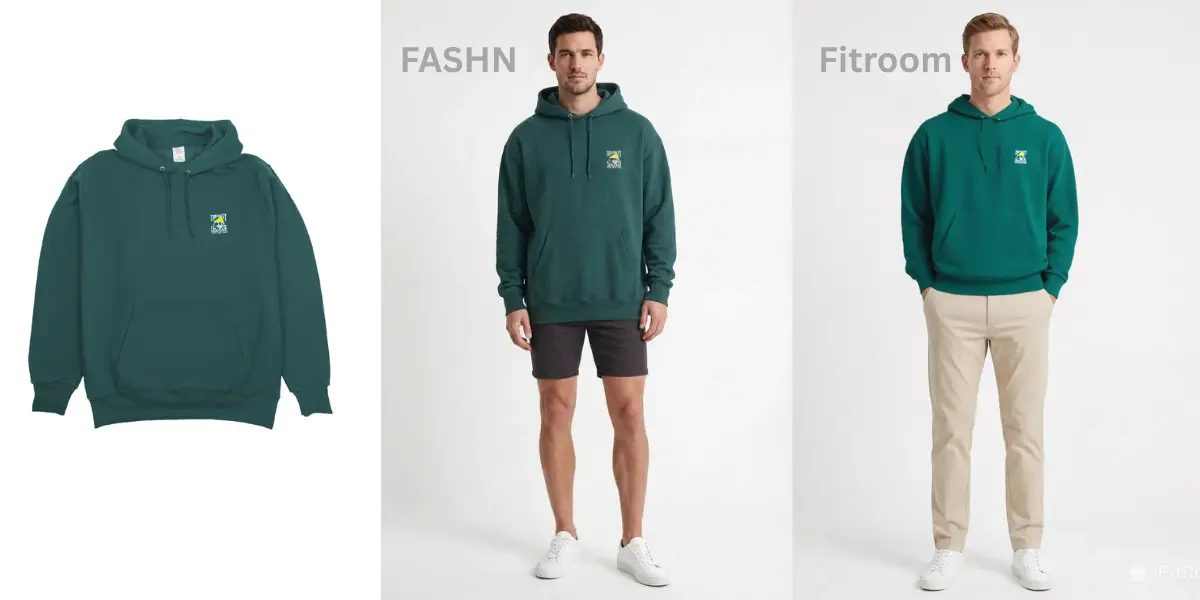
- **Image: Dress comparison
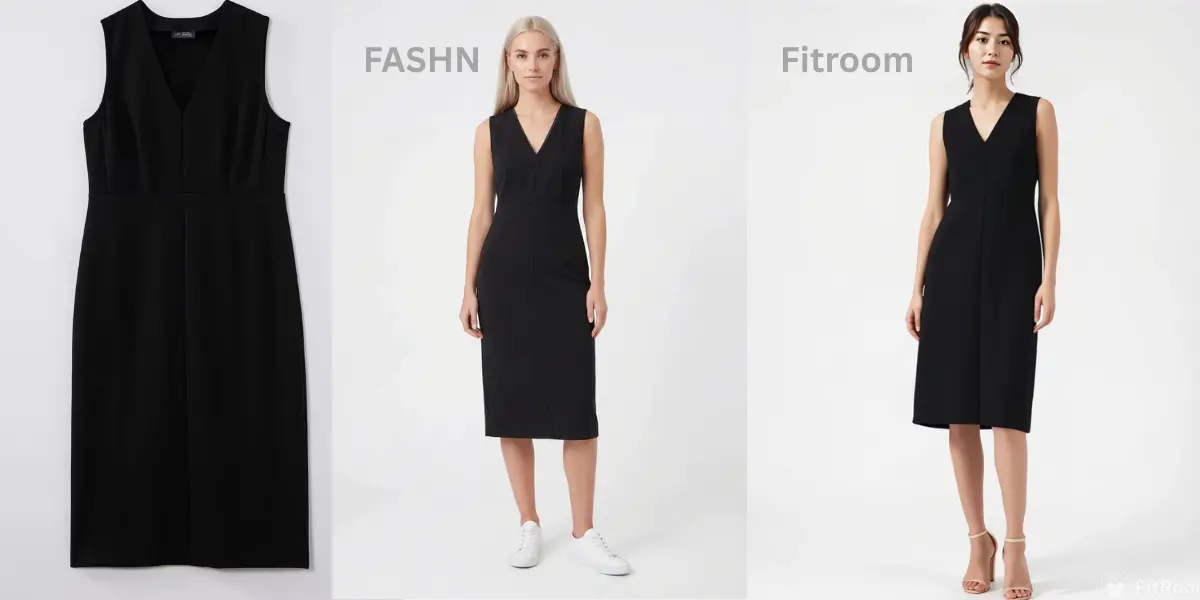
**
Pricing Comparison: From First Test to Full Scale
Most pricing comparisons start at 10,000 images per month. That’s not where most developers actually start. You start with 50 test images, then 200, then 1,000 as you build confidence in the output. Here’s how both APIs compare from the very beginning — and which plan to choose at each stage.
Understanding FASHN.ai’s actual cost per image
FASHN.ai advertises pricing per credit, not per image. Try-On Max — their recommended endpoint for e-commerce, which costs 2 credits per image at the cheapest setting (1K resolution, balanced mode). That makes the real cost per image:
| FASHN.ai plan | Cost per credit | Cost per image (1K balanced = 2 credits) | Included images/month |
|---|---|---|---|
| On-Demand | $0.075 | $0.15/image | Pay per use, min $7.50 |
| Tier I — $19/month | $0.0675 (top-up) | $0.135/image | ~141 images included |
| Tier II — $249/month | $0.0600 (top-up) | $0.12/image | ~2,075 images included |
| Tier III — $1,249/month | $0.0488 (top-up) | $0.0976/image | ~12,797 images included |
If you need 2K or 4K resolution output, add 50–150% to these numbers. At 4K quality mode (5 credits/image), the on-demand cost is $0.375 per image.
Fitroom pricing: one credit, one image
| Fitroom plan | Cost | Cost per image | Notes |
|---|---|---|---|
| PAYG — 200 credits | $20 one-time | $0.10/image | Credits never expire |
| PAYG — 500 credits | $30 one-time | $0.06/image | Credits never expire |
| PAYG — 1,000 credits | $50 one-time | $0.05/image | Credits never expire |
| PAYG — 5,000 credits | $200 one-time | $0.04/image | Credits never expire |
| Sub — 200 credits/month | $12/month | $0.06/image | Unused credits roll over |
| Sub — 500 credits/month | $20/month | $0.04/image | Unused credits roll over |
| Sub — 1,000 credits/month | $35/month | $0.035/image | Unused credits roll over |
| Sub — 5,000 credits/month | $120/month | $0.024/image | Unused credits roll over |
| Sub — 20,000 credits/month | $400/month | $0.02/image | Unused credits roll over |
| Sub — 50,000 credits/month | $800/month | $0.016/image | Unused credits roll over |
Head-to-head: which plan to use at each volume
The table below shows the recommended plan for each API at each volume tier, and how much Fitroom saves.
| Monthly volume | Best Fitroom plan | Fitroom cost | Best FASHN.ai plan | FASHN.ai cost | Fitroom saves |
|---|---|---|---|---|---|
| 100 images | PAYG 200 credits | $20 (one-time, 200 usable) | On-Demand | ~$15 | FASHN cheaper here |
| 200 images | Sub 200 credits/mo | $12/month | On-Demand | ~$30 | 60% cheaper |
| 300 images | Sub 500 credits/mo | $20/month | On-Demand | ~$45 | 56% cheaper |
| 500 images | Sub 500 credits/mo | $20/month | On-Demand | ~$75 | 73% cheaper |
| 1,000 images | Sub 1,000 credits/mo | $35/month | On-Demand | ~$150 | 77% cheaper |
| 2,000 images | Sub 5,000 credits/mo | $120/month | Tier II $249/mo (~2,075 images) | $249/month | 52% cheaper |
| 5,000 images | Sub 5,000 credits/mo | $120/month | Tier II + top-ups | ~$609/month | 80% cheaper |
| 10,000 images | Sub 20,000 credits/mo | $400/month | Tier III + top-ups | ~$1,249+/month | 68% cheaper |
| 20,000 images | Sub 20,000 credits/mo | $400/month | Tier III + top-ups | ~$2,107/month | 81% cheaper |
| 50,000 images | Sub 50,000 credits/mo | $800/month | Tier III + top-ups | ~$4,037/month | 80% cheaper |
The only tier where FASHN.ai is cheaper is very low volume — under 200 images/month — where their on-demand minimum (~$15 for 100 images) beats Fitroom’s entry subscription of $12 for 200 images. From 200 images upward, Fitroom is cheaper at every tier, and the gap widens with scale.
The “building phase” reality
Most developers evaluating virtual try-on APIs aren’t buying 10,000 images upfront. They move through three phases: testing the integration (under 200 images), validating product-market fit (200–2,000 images), and scaling a working product (5,000+).
For the testing phase, Fitroom’s PAYG option is ideal — buy a 200-credit pack for $20, use it at your own pace, and the credits never expire. No subscription commitment while you’re still figuring out if virtual try-on fits your product. Once you’ve validated the integration and are processing consistently, switching to a subscription drops your per-image cost immediately.
The resolution cost trap with FASHN.ai
One cost driver that’s easy to miss when reading FASHN.ai’s pricing: every resolution tier multiplies your credit consumption. At 2K output — reasonable for a product page — you’re at 3 credits per image instead of 2, a 50% increase. At 4K quality mode, you’re at 5 credits per image — 2.5x the baseline cost. A team running 5,000 images/month expecting to pay ~$750 (on-demand, 1K balanced) would actually pay ~$1,875 at 4K quality. Fitroom’s HD mode is a fixed option with no credit multiplier — the cost is predictable regardless of output settings.
Side-by-Side Technical Comparison
| Feature | Fitroom | FASHN.ai |
|---|---|---|
| API type | REST (multipart/form-data) | REST (JSON) |
| Auth method | X-API-KEY header | Bearer token |
| Processing model | Async (create task → poll status) | Async (submit → poll status) |
| Standard processing time | ~9 seconds | 5–17s (v1.6) / 20–120s (Try-On Max) |
| HD / high-res option | HD mode ~30s, flat credit cost | 1K/2K/4K resolution tiers — credit multiplier applies |
| Max output resolution | 2048px | Up to 4K (~16MP) |
| Credits per image | 1 credit = 1 image, always | 2–5 credits per image depending on resolution + mode |
| Input validation endpoints | ✅ Check Model + Check Clothes | ❌ None |
| Combo try-on (upper + lower) | ✅ Single request | ❌ Separate requests required |
| Garment types supported | Upper, lower, full body, combo outfit | Clothing, shoes, hats, jewelry, bags |
| Preset model library | ❌ Bring your own model photo | ✅ 40+ preset models |
| Prompt customization | ❌ | ✅ (“tuck in shirt”, “open jacket”, etc.) |
| Webhooks | ❌ Poll only | ✅ |
| SDKs | REST only, curl examples | Python + TypeScript SDKs |
| Failed request billing | Not charged | Not charged on qualifying errors |
| Credit expiry | PAYG: never. Subscription: rolls over. | Top-up credits expire after 12 months |
| Output URL availability | URL returned on task completion | CDN URL valid 72h / Base64 valid 60min |
| Base64 input/output | ❌ File upload via form-data | ✅ URL or base64 |
| Multiple outputs per request | ❌ | ✅ Up to 4 per request |
The honest technical picture: FASHN.ai has more features at the API layer — webhooks, SDKs, preset models, prompt control, base64 I/O, multi-image output, and broader accessory support. Fitroom trades some of those features for simpler integration, input validation, combo try-on, and a pricing structure that’s significantly more cost-efficient for apparel-focused use cases.
For a developer building a consumer app that needs webhook callbacks, TypeScript SDKs, and accessories support, FASHN.ai’s feature set is genuinely useful. For a fashion e-commerce team or POD seller integrating try-on into product pages at scale, Fitroom’s pricing and input validation are the more practical advantages.
Switching from FASHN.ai to Fitroom: What It Actually Takes
If you’re already integrated with FASHN.ai, the migration is more straightforward than it might look. Both APIs follow the same async pattern: submit a request, get an ID, poll for status, retrieve the output URL. The core application logic doesn’t change.
What does change: the endpoint URL, authentication header format (Bearer token → X-API-KEY), and request body format (JSON → multipart/form-data). FASHN.ai accepts image URLs or base64; Fitroom accepts file uploads via form-data. If your integration passes image URLs rather than uploading files directly, plan to add a download step before uploading to Fitroom.
For a basic integration swap, plan 2–3 days. For a production-quality migration — adding Fitroom’s input validation endpoints, updating error handling for the new error codes, and running regression tests across your garment catalog — plan 1–2 weeks. The regression testing is the step worth doing carefully: run a representative sample of your garments through both APIs and verify the output meets your quality bar before switching traffic over.
Who Should Switch — and Who Shouldn’t
Fitroom is the better choice if: you’re processing apparel (tops, bottoms, dresses, outerwear) and want the lowest cost per image at any volume above 200 images/month; you need combo try-on for outfit generation; you want input validation to reduce wasted credits on bad uploads; or you have variable usage and need credits that don’t expire.
FASHN.ai is the better choice if: you need output resolution above 2048px for print or large-format display; your use case covers accessories — shoes, hats, bags, jewelry — that Fitroom doesn’t support; you need webhook callbacks for your processing pipeline; or your team is already building on their Python/TypeScript SDKs and prompt customization is important to your product.
If you’re under 200 images/month: either works. At very low volume, FASHN.ai’s on-demand pricing ($0.15/image minimum) is marginally cheaper than Fitroom’s entry options. Buy Fitroom’s PAYG pack to test the integration, then decide based on output quality — not price — at that stage.
Other Options Worth Knowing About
Two other names come up in developer research, though neither is a direct FASHN.ai replacement in the way Fitroom is.
Pixazo is an API aggregator — it routes requests across multiple virtual try-on models through a single interface and unified billing. Useful if you’re still benchmarking and want to test several models without building separate integrations. It’s a research tool, not a production choice; once you’ve identified the right output quality for your use case, you’ll want a direct API relationship with a single provider for reliability and cost control.
Google Vertex AI offers generative image capabilities that can be adapted for virtual try-on, and is a reasonable fit for enterprise teams already deep in the GCP ecosystem. The trade-off is significant setup overhead — you’re building ML pipelines, not calling an endpoint. For most developers integrating try-on into a product, the time cost isn’t justified unless you have specific infrastructure or data residency requirements that a managed API can’t meet.
Neither changes the core calculus. If your goal is production-ready apparel try-on at predictable cost, the Fitroom vs FASHN.ai comparison is the one that actually matters.
In details, you can read: Best Virtual Try-on APIs compared
Frequently Asked Questions
Is Fitroom a good FASHN.ai alternative?
Yes. Fitroom delivers comparable output quality for apparel, processes images in approximately 9 seconds, and costs 60–80% less than FASHN.ai at volumes above 200 images/month. It also includes input validation endpoints and combo try-on in a single request — two features FASHN.ai’s API doesn’t offer.
How much cheaper is Fitroom compared to FASHN.ai?
FASHN.ai’s Try-On Max costs a minimum of $0.15 per image on-demand (2 credits × $0.075/credit). Fitroom’s subscription starts at $0.06/image for 200 images/month and drops to $0.016/image at 50,000 images/month. At 1,000 images/month, Fitroom costs $35 versus FASHN.ai’s ~$150. At 5,000 images/month, Fitroom costs $120 versus FASHN.ai’s ~$609.
Does Fitroom charge for failed API requests?
No. Fitroom does not charge credits for failed predictions. It also provides optional input validation endpoints to catch bad images before running the try-on — reducing failures before they happen rather than handling refunds after.
How long does Fitroom API take to process one image?
Standard mode runs in approximately 9 seconds. HD mode runs in approximately 30 seconds. FASHN.ai’s Try-On Max runs 20–120 seconds depending on resolution and generation mode — significantly slower for the configurations that produce the best output.
Do Fitroom credits expire?
No. PAYG credits never expire. Subscription credits roll over month to month as long as you stay subscribed. FASHN.ai top-up credits expire after 12 months — a meaningful risk for teams with seasonal usage patterns.